

Template Subscription Buttons
This guide shows you how to subscribe and react to "subscription" buttons. Subscription buttons are used to detect when the user has interacted with buttons located in the car's center console or steering wheel. A subscription button may also show up as part of your template, however, the text and/or image used in the button is determined by the template and is (usually) not customizable.
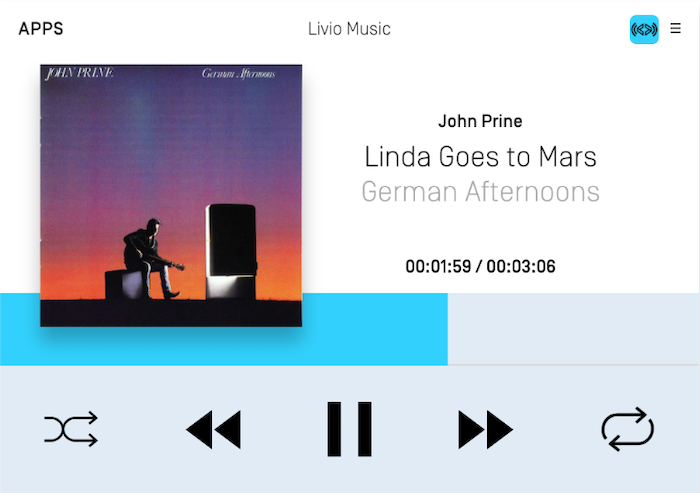
In the screenshot below, the pause, seek left and seek right icons are subscription buttons. Once subscribed to, for example, the seek left button, you will be notified when the user selects the seek left button on the HMI or when they select the seek left button on the car's center console and/or steering wheel.
Subscribing to Subscription Buttons
Please note that you can only successfully subscribe to certain buttons depending on your app type. Audio-related buttons can only be used with the MEDIA app type and navigation-related buttons can only be used with the NAVIGATION app type.
| Button | App Type | RPC Version |
|---|---|---|
| Ok | All | v1.0+ |
| Preset 0-9 | All | v1.0+ |
| Search | All | v1.0+ |
| Play / Pause | Media only | v5.0+ |
| Seek left | Media only | v1.0+ |
| Seek right | Media only | v1.0+ |
| Tune up | Media only | v1.0+ |
| Tune down | Media only | v1.0+ |
| Center Location | Navigation only | v6.0+ |
| Zoom In | Navigation only | v6.0+ |
| Zoom Out | Navigation only | v6.0+ |
| Pan Up | Navigation only | v6.0+ |
| Pan Up-Right | Navigation only | v6.0+ |
| Pan Right | Navigation only | v6.0+ |
| Pan Down-Right | Navigation only | v6.0+ |
| Pan Down | Navigation only | v6.0+ |
| Pan Down-Left | Navigation only | v6.0+ |
| Pan Left | Navigation only | v6.0+ |
| Pan Up-Left | Navigation only | v6.0+ |
| Toggle Tilt | Navigation only | v6.0+ |
| Rotate Clockwise | Navigation only | v6.0+ |
| Rotate Counter-Clockwise | Navigation only | v6.0+ |
| Toggle Heading | Navigation only | v6.0+ |
Audio-Related Buttons
The play/pause, seek left, seek right, tune up, and tune down subscribe buttons can only be used if the app type is MEDIA. Depending on the OEM, the subscribed button could show up as an on-screen button in the MEDIA template, work as a physical button on the car console or steering wheel, or both. For example, Ford's SYNC 3 HMI will add the play/pause, seek right, and seek left soft buttons to the media template when you subscribe to those buttons. However, those buttons will also trigger when the user uses the seek left / seek right buttons on the steering wheel.
If desired, you can toggle the play/pause button image between a play, stop, or pause icon by updating the audio streaming state as described in the Media Clock guide.

Note
Before library v.6.1 and RPC v5.0, Ok and PlayPause were combined into Ok. Subscribing to Ok will, in v6.1+, also subscribe you to PlayPause. This means that for the time being, you should not simultaneously subscribe to Ok and PlayPause. In a future major version, this will change. For now, only subscribe to either Ok or PlayPause and the library will execute the right action based on the connected head unit.
Objective-C
SDLSubscribeButton *subscribeButton = [[SDLSubscribeButton alloc] initWithButtonName:SDLButtonNamePlayPause handler:^(SDLOnButtonPress * _Nullable buttonPress, SDLOnButtonEvent * _Nullable buttonEvent) {
    if (buttonPress == nil) { return; }
    <#Subscribe button selected#>
}];
[self.sdlManager sendRequest:subscribeButton withResponseHandler:^(__kindof SDLRPCRequest * _Nullable request, __kindof SDLRPCResponse * _Nullable response, NSError * _Nullable error) {
    if (!response.success.boolValue) { return; }
    <#Subscribe button sent successfully#>
}];
Swift
let subscribeButton = SDLSubscribeButton(buttonName: .playPause) { (buttonPress, buttonEvent) in
    guard let buttonPress = buttonPress else { return }
    <#Subscribe button selected#>
}
sdlManager.send(request: subscribeButton) { (request, response, error) in
    guard response?.success.boolValue == true else { return }
    <#Subscribe button sent successfully#>
}
Preset Buttons
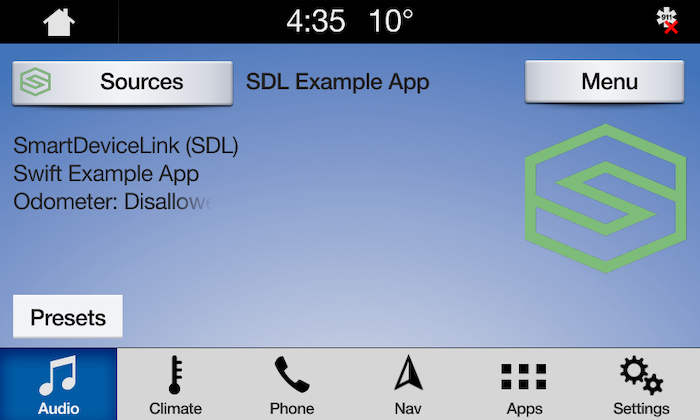
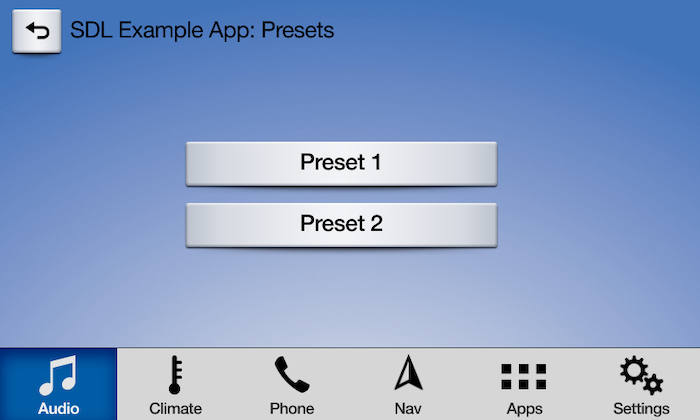
All app types can subscribe to preset buttons. Depending on the OEM, the preset buttons may be added to the template when subscription occurs. Preset buttons can also be physical buttons on the console that will notify the subscriber when selected. An OEM may support only template buttons or only hard buttons or they may support both template and hard buttons. The screenshot below shows how the Ford SYNC 3 HMI displays the preset buttons on the HMI.
Checking if Preset Buttons are Supported
You can check if a HMI supports subscribing to preset buttons, and if so, how many preset buttons are supported, by checking the system capability manager.
Objective-C
NSInteger numberOfCustomPresetsAvailable = self.sdlManager.systemCapabilityManager.defaultMainWindowCapability.numCustomPresetsAvailable.integerValue;
Swift
let numberOfCustomPresetsAvailable = sdlManager.systemCapabilityManager.defaultMainWindowCapability.numCustomPresetsAvailable as? NSInteger
Subscribing to Preset Buttons
Objective-C
SDLSubscribeButton *preset1 = [[SDLSubscribeButton alloc] initWithButtonName:SDLButtonNamePreset1 handler:^(SDLOnButtonPress * _Nullable buttonPress, SDLOnButtonEvent * _Nullable buttonEvent) {
    if (buttonPress == nil) { return; }
    <#Subscribe button selected#>
}];

SDLSubscribeButton *preset2 = [[SDLSubscribeButton alloc] initWithButtonName:SDLButtonNamePreset2 handler:^(SDLOnButtonPress * _Nullable buttonPress, SDLOnButtonEvent * _Nullable buttonEvent) {
    if (buttonPress == nil) { return; }
    <#Subscribe button selected#>
}];

[self.sdlManager sendRequests:@[preset1, preset2] progressHandler:nil completionHandler:^(BOOL success) {
    if (!success) { return; }
    <#Subscribe buttons sent successfully#>
}];
Swift
let preset1 = SDLSubscribeButton(buttonName: .preset1, handler: { (buttonPress, buttonEvent) in
    guard let buttonPress = buttonPress else { return }
    <#Subscribe button selected#>
})

let preset2 = SDLSubscribeButton(buttonName: .preset2, handler: { (buttonPress, buttonEvent) in
    guard let buttonPress = buttonPress else { return }
    <#Subscribe button selected#>
})

self.sdlManager.send([preset1, preset2], progressHandler: nil, completionHandler: { (success) in
    guard success else { return }
    <#Subscribe buttons sent successfully#>
})
Navigation Buttons
Head units supporting RPC v6.0+ may support subscription buttons that allow your user to drag and scale the map using hard buttons located on car's center console or steering wheel. Subscriptions to navigation buttons will only succeed if your app's type is NAVIGATION. If subscribing to these buttons succeeds, you can remove any buttons of your own from your map screen. If subscribing to these buttons fails, you can display buttons of your own on your map screen.
Subscribing to Navigation Buttons
Objective-C
SDLSubscribeButton *navPanUpButton = [[SDLSubscribeButton alloc] initWithButtonName:SDLButtonNameNavPanUp handler:^(SDLOnButtonPress * _Nullable buttonPress, SDLOnButtonEvent * _Nullable buttonEvent) {
    if (buttonPress == nil) { return; }
    <#Subscribe button selected#>
}];

[self.sdlManager sendRequest:navPanUpButton withResponseHandler:^(__kindof SDLRPCRequest * _Nullable request, __kindof SDLRPCResponse * _Nullable response, NSError * _Nullable error) {
    if (!response.success.boolValue) { return; }
    <#Subscribe button sent successfully#>
}];
Swift
let navPanUpButton = SDLSubscribeButton(buttonName: .navPanUp) { (buttonPress, buttonEvent) in
    guard let buttonPress = buttonPress else { return }
    <#Subscribe button selected#>
}

sdlManager.send(request: navPanUpButton) { (request, response, error) in
    guard response?.success.boolValue == true else { return }
    <#Subscribe button sent successfully#>
}